A while ago, I slated the majority of free running android apps
because they failed to cater for my disability: I’m long-sighted and
need reading glasses to start the majority of running apps, which is a
real nuisance since I don’t need glasses for running. Not only that, my
other gripes were lack of lock screens that should be there to prevent
logging being stopped by accident, and the inccuracy of GPS recording. See my review here.
I tested five running apps and Runtastic’s v3.6.1 came in third. I
didn’t like how nag screens were enabled by default (the screens asking
if you would like to be cheered on and encouraged by your ‘friends’ as
you do your run). I didn’t like the inaccuracy of the GPS and how much
worse it became when using it in ‘walk’ mode. However, I did like it’s
slick interface, it’s large coloured buttons (enabling me to start and
stop a session without my glasses); it’s fool-proof stop button and the
way it links with MyFitnessPal to upload calories burnt at the end of a
session.
It’s apparent that apps are being developed and improved, almost on a
daily basis – every time I switch my phone on, it notifies me there is
an update for one app or another. In fact, it becomes a chore having to
update everything if, like me, you have opted to be in control of your
phone and update apps manually. When you want.
So with such a significant upgrade in revisions, how would Runtastic fare this time?
Review: Runtatastic Pro v4.1 Running App for Android
UPGRADING:Was
flawless. The installer removed the previous version and kept my
workout data. It updated the widget I had opted to have on one of my
Android main screens. I did have to drag and drop a program shortcut
from the apps screen to one of my main pages though. The new version
loaded my previous workout sessions without problem and had kept log in
information for connected accounts such as MyFitnessPal, Facebook,
Twitter and Google + STARTING A SESSION:
Before I commenced my run and while I was wearing my reading glasses, I
checked the settings page to see if the Live Tracking was disabled. It
was but this preference could have been carried over from the previous
installation where I had disabled it myself. Therefore, I’m not sure how
this version is configured if you were to perform a fresh installation.
My advice is: make sure it’s turned off before you do anything else. This is how I see Runtastic’s Start button
Starting the app takes you straight to the session screen and it’s
better than before. The start button is huge and dominates the central
part of the screen. Perfect for anyone, especially those who can’t see
without optical correction!
Press that blurred green blob and the countdown to your work out session begins; 5, 4, 3…
Not enough time to affix your phone strap to your arm? Runtastic have
thought of that. There are three large grey buttons on the next screen
that give you a choice of another 5 seconds countdown, 15 seconds or 30
seconds. I’ve found that 15 seconds is plenty of time for me to secure
the strap to my arm and make myself ready. LOCK SCREEN:
A horizontal black bar and padlock symbol replaces the start button
once a session has commenced. Pressing that initiates the appearance of
the large, orange-pause and red-stop buttons. Fool-proof and easy to
see! Session recording and screen locked. Touch the black bar when your session is complete.Pause and Stop buttons very clear and distinguishable.STOPPING A SESSION:
Press the red button and the the session summary appears. In this
screen it is possible to enter more details about your run like the type
of terrain, how you feel and weather details. At this stage I do need
my glasses to save my run details. But I can’t complain about that
really. At a push, I know the save button is top right if they were not
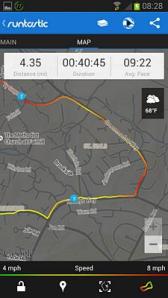
at hand. Session summary.GPS ACCURACY: I ran a familiar course of known distance, calculated from Google Earth.
The distance recorded by Runtastic was 4.35 miles
The distance measured on Google Earth: 4.29miles
Difference between the two measurements: +/- 1.4%
Very good. I’m happy with that.
Initially, I thought that the app developers had done an excellent
job at quelling my OCD regarding the accuracy of the GPS by limiting the
amount of zoom on the course map. In terrain (default) mode, zoom is
indeed limited. Maximum zoom level in terrain (default) mode.
I can no longer zoom to street levels to see if it has logged me
running through houses, crossing lakes and wandering aimlessly from one
side of the road to another. And maybe that’s a good thing. After all,
the overall distance run was logged with as much precision as can be
expected when you consider the errors associated with the global
positioning system.
I later discovered though that it is possible to zoom in further by
selecting the satellite overlay on the map. And guess what? The GPS
accuracy actually seems better than the previous version. A big
improvement. I’d say it’s now comparable with the map my fitness suite
of programs; the accuracy of which I held in high regard in my last
review.
SUMMARY
Runtastic Pro v4.1 has a slick interface and is easy to use. It
caters for my poor eye-sight when starting and stopping a session.
The screen locks to prevent accidental stoppage of the session log.
This is essential if you carry your Android device in a strap on your
arm or waist. Why? See my previous review here.
Distance measured by GPS was comparable to that measured on Google Earth and acceptable with a difference of only 1.4%.
The accuracy of GPS at street level is much improved in this version. It’s now comparable with the competition.
Seems to be a very good product. It moves to pole position for me. Recommended.






0 Comments
Good day precious one, We love you more than anything.