
It’s that time again.
Microsoft has decided to place its bets elsewhere after the bet that
mobile-desktop fusions would actually pan out in the end. After
suffering disappointment from public reactions to Windows 8 and its
Modern/Metro interface, it’s decided to up the ante a little bit and
release a completely new operating system that follows a different
formula. Sometime in 2015, Microsoft will be releasing Windows 9, and
we’ve got a little bit of the scoop regarding what it will look like and
how it will work. It’s time to put aside whatever we may feel about
Windows 8 and see what Windows 9 might have to offer.

With Windows 9, however, it seems as if MS is rethinking its strategy and hoping to distance itself from the fallout that was its previous OS iteration. Windows 9, instead of offering both worlds at the same time, will change and adapt its interface according to whatever you’re running it on. Codenamed “Threshold”, this new operating system will detect whether you have a keyboard and mouse. If you do, you’ll be opted into the desktop experience. The absence of these peripherals (and the presence of touch-based hardware) will trigger Windows 9 to load up a mobile platform.
This has to be one of the most significant improvements to the system’s user interface. It certainly would disgruntle users much less than Windows 8 did.
In case this new menu seems a little bit confusing, I’ll explain it to you. Windows 9 is introducing a menu system in which it will show you your desktop applications on one end and your mobile applications on the other. You’ll be able to open mobile applications in a window in case you prefer that over the full-screen setup that Windows 8 had until now. This still gives it a little bit of a mobile/desktop fusion flavor, but Windows 9 doesn’t forget that you’re still running it on a desktop computer.
1: Windows 9’s Interface Will Adapt To The Device You’re Using
Windows 8 was a pretty stable system with some great features, but all of that mattered little when you were greeted by the “Start screen” or, as they call it, the Modern interface. Many users did not take kindly to the system when they first tested it, and the operating system’s poor sales were a reflection of the negativity surrounding this attempt to unify mobile and desktop experiences. Microsoft made a very risky bet, and it really didn’t pan out very well after the fact.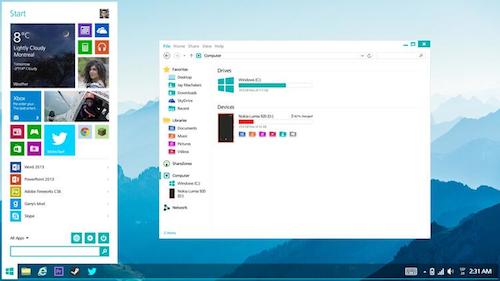
With Windows 9, however, it seems as if MS is rethinking its strategy and hoping to distance itself from the fallout that was its previous OS iteration. Windows 9, instead of offering both worlds at the same time, will change and adapt its interface according to whatever you’re running it on. Codenamed “Threshold”, this new operating system will detect whether you have a keyboard and mouse. If you do, you’ll be opted into the desktop experience. The absence of these peripherals (and the presence of touch-based hardware) will trigger Windows 9 to load up a mobile platform.
This has to be one of the most significant improvements to the system’s user interface. It certainly would disgruntle users much less than Windows 8 did.
2: The Start Menu Will Return
Millions of people around the world were shocked to see that Windows 8 had no Start menu. It was perhaps the biggest flop in the entire operating system’s history. Microsoft recognizes that this was a mistake and has decided to bring the Start menu back in Windows 9, according to The Verge. However, this new Start menu will be just a little different. I think that an image will describe it better than words: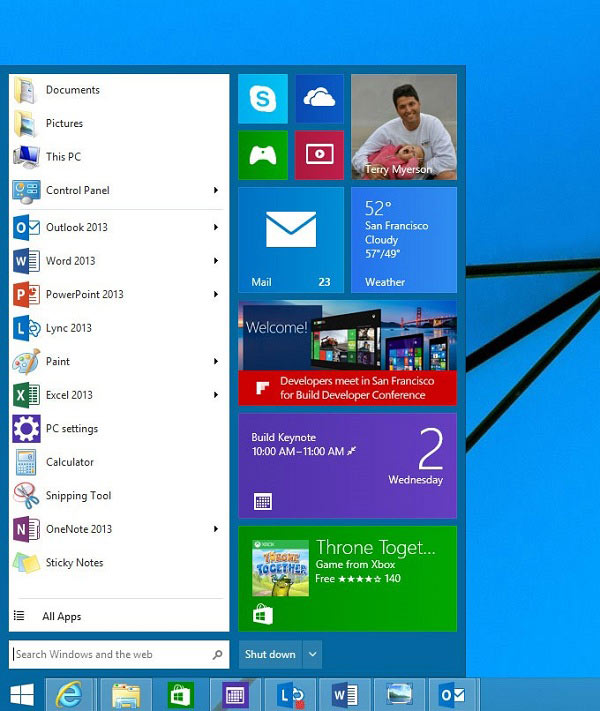
In case this new menu seems a little bit confusing, I’ll explain it to you. Windows 9 is introducing a menu system in which it will show you your desktop applications on one end and your mobile applications on the other. You’ll be able to open mobile applications in a window in case you prefer that over the full-screen setup that Windows 8 had until now. This still gives it a little bit of a mobile/desktop fusion flavor, but Windows 9 doesn’t forget that you’re still running it on a desktop computer.


0 Comments
Good day precious one, We love you more than anything.