
Facebook
has evolved massively from the last couple of years. They have been
very strict about the application spams, link spams and manual spams.
They took over as many spam links as possible in very less time. But one
thing which Facebook is unable to control is the manual spam links,
which are later generated by bots to take control on. So if you click on
these spam links, the links will automatically generate a spam loop by
posting a status in all your Facebook groups. This is really annoying to
the admin who is taking care of that group.
Step 1: Log into your Facebook account and open the group you wanted to moderate.
Step 2: Click on the Edit Group Settings option to open the settings page.

Step 3: Check the Post Approval option, which says All group posts must be approved by admin.

Step 4: Click on Save button to accept the changes you made in the settings page.
Step 5: Now look for any spam posts made by your members to moderate them personally. Facebook will show you a notification of pending posts, which can be approved or deleted as per your choice.

Step 6: Click on the 2 posts require approval which you are seeing in the above screenshot to moderate the posts.
Step 7: Delete the unwanted and spam posts which were bothering you from much longer period of time.

This way you can moderate all the spam posts, promotional posts, manual link posts, automated links and application spam posts happily. Also you can remove and ban the user, then and there itself. I hope this article has helped you in moderating your group safely and smartly. Please leave your comments if you have any.
Steps to Stop Spam Links in Facebook Groups:
There are many group admins in Facebook, who literally ban you from their groups after seeing your spam post. This is really annoying for admins, as well as the normal Facebook users. If you are an admin of any Facebook group, try following the simple steps to avoid Facebook spam messages in future. This simple method will save your time on deleting all those spammy links posted by your group members.Step 1: Log into your Facebook account and open the group you wanted to moderate.
Step 2: Click on the Edit Group Settings option to open the settings page.
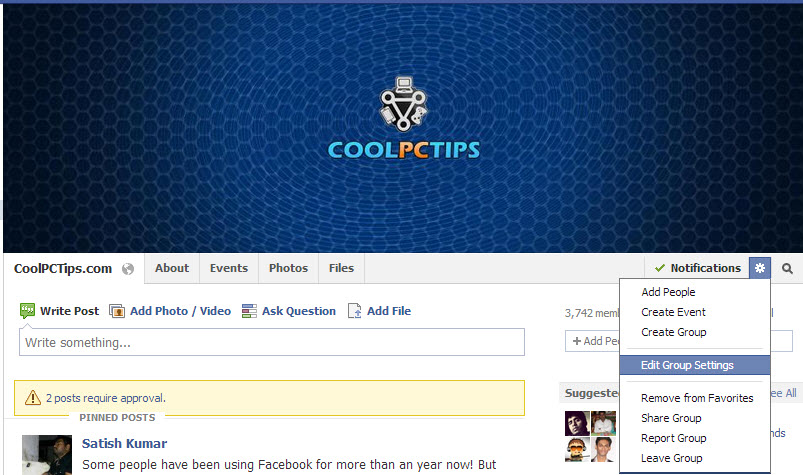
Step 3: Check the Post Approval option, which says All group posts must be approved by admin.
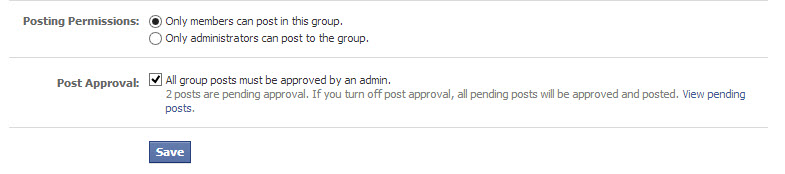
Step 4: Click on Save button to accept the changes you made in the settings page.
Step 5: Now look for any spam posts made by your members to moderate them personally. Facebook will show you a notification of pending posts, which can be approved or deleted as per your choice.
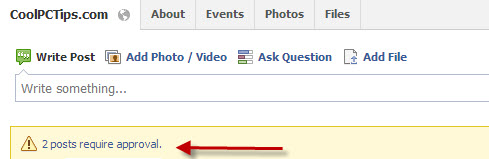
Step 6: Click on the 2 posts require approval which you are seeing in the above screenshot to moderate the posts.
Step 7: Delete the unwanted and spam posts which were bothering you from much longer period of time.

This way you can moderate all the spam posts, promotional posts, manual link posts, automated links and application spam posts happily. Also you can remove and ban the user, then and there itself. I hope this article has helped you in moderating your group safely and smartly. Please leave your comments if you have any.



0 Comments
Good day precious one, We love you more than anything.